I’ve had adventures with Live Mesh before (Live Mesh Ceased Connecting After Update). Today’s adventures were of a different sort.
First, Live Mesh wouldn’t connect and, therefore, wouldn’t synchronize data with my laptop. I could connect to Live Mesh through a browser just fine. When in the browser I could see the folders and that the same folders had updated. But Live Mesh itself was not connecting. It was reporting the error message “Failed to start Live Mesh.” No amount of stopping and starting Live Mesh or rebooting the computer resolved the condition.

Naturally, this situation was fairly frustrating and the normal Google research didn’t reveal much about the why the start failure happened or what could be done to resolve the situation. I did learn that Live Mesh does have the ability to collect logs and send those to Microsoft as part of a bug report. On the start menu choose Live Mesh –> Collect Live Mesh Logs.
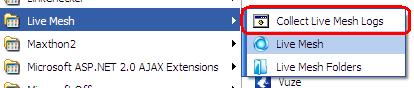
This will launch a batch file that will launch a command prompt that will collect a bunch of logs and create a CAB file on your desktop to send to Microsoft (it should be name LiveMeshLogs.cab). In my case, this log file was over 100 meg. I wasn’t going to send that to Microsoft, so I fired up my trusty CAP explorer (WinZip) to see what it had. The number and kind of log files vary by system (as I later learned). The file that you are looking for is, probably, the latest file with a name like Moe-YOURCOMPUTERNAME-YOURUSERNAME-2010-04-05-101026.log.
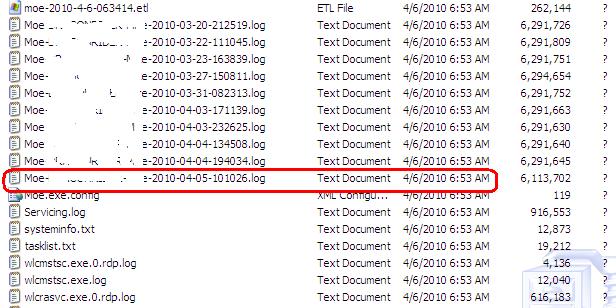
Open that last log file to see the most recent error that Live Mesh has recorded. The lines that are in the file will vary. In my case the one I needed was:
2010-04-06 13:49:05.468,WARN,AccountsManager,0,1,4,The current device certificate in MOE accounts
cache doesn't match the device certificate obtained from the AuthenticationProvider.
Basically, this log message suggested that somehow the Live Mesh configuration had become corrupt. With that being the case, there really were few options available. Remove Live Mesh and reinstall was really it.
Googling for this particular error message didn’t yield a solution, but other similar complaints described the process to follow.
1. Remove the machine from your device ring at www.mesh.com
2. Uninstall Live Mesh
3. Reboot
4. Reinstall Live Mesh from www.mesh.com
It is very important to follow the instruction exactly. I did not and that led to the second adventure.
I messed up the very first step. I removed the wrong computer from the device ring (mesh). This caused me not to be able to access the computer removed from the mesh through Live Mesh’s remote desktop functionality. That was the whole point of using Live Mesh as there were files on the remote computer that would have been helpful for work (I’d forgotten to commit to version control before heading in).
Removing and reinstalling Live Mesh did resolve the “Failed to start Live Mesh” error.
When I arrived home, I needed to add the computer I had accidentally removed from the mesh back. That seemed to go alright. But it didn’t actually as the synchronized folders were desynchronized. The Live Mesh folders were sitting on my desktop waiting for me to tell them where to synch. So I pointed them at the existing folders. Live Mesh complained that the folders already existed and that if they contained data then the existing folders would be merged with the mesh folders. That was fine.
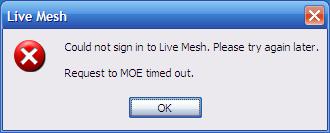
Then Live Mesh displayed this error:
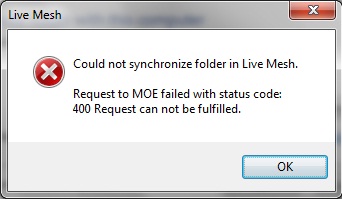
Very, very cryptic. Googling failed as well.
I went through the process of creating the Live Mesh logs on this computer and locating the most recent log file within the CAB. The log message looks like:
2010-04-06 23:44:01.843,INFO,Moe,0,0,19,Request failed:
http://localhost:2048/Proxy/(https)storage.mesh.com(443)/CoreObjects/TXF4IUNOOTCE5EQ4O76G4AHCVM/Members/DFLW2IQ4QIREJDMYVNBBPKAJKQ/Mappings/ POST COM
InternalServerError:Invalid mapping location: 'C:\Some\Directory'.
Googling this error message didn’t reveal any useful information. But, it did suggest that removing the wrong computer from the mesh earlier in the day probably was the proximate cause of the problem. So, I followed the process of removing the computer from the mesh, uninstalling Live Mesh, rebooting, and reinstalling as described above. Once that was done I was able to resynchronize the mesh folders with this computer.
All is well once again with my use of Live Mesh.