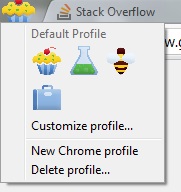
Google Chrome let me know that it needed to be restarted to load an update this morning. I was a little surprised when it restarted as there was an unexpected icon in the upper left corner. There was this little cupcake. Clicking the icon brought up the “profile” menu.
Bad Cupcake
I’m not a big fan of cupcakes. None of the other optional icons are all that interesting either. Why clutter up the interface with this stuff? One of the big selling points for me with the Chrome browser has been the distinct lack of extraneous stuff in the browser. There has been just the tabs and the address bar and nothing to get in the way of using the browser as efficiently as possible.
More disturbingly, there appears to be no way to make the annoying cupcake icon go away permanently. The best that can be done is switch to one of the other icons.
The burning question is, of course, why the profile related settings couldn’t have been placed on the regular menu accessible through the small, unobtrusive wrench icon.
The other day I was looking for a different instant messaging application that could be used with the system we use at work. I came across Trillian Astra and decided to try it since it looked like it would connect to our network.
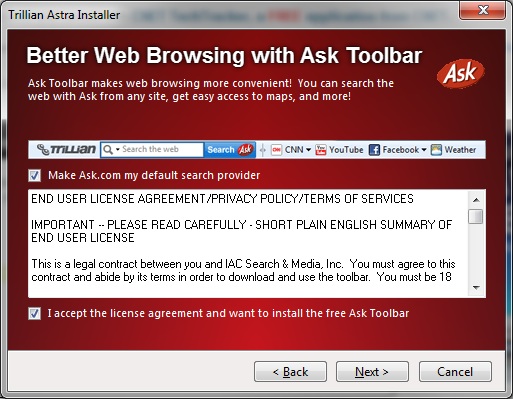
Trillian has an attractive installer. But they’ve adopted what seems to be a common practice of installing an unnecessary Internet Explorer toolbar as well as offering to change the Internet Explorer’s default search provider. They also adopted the common practice of swapping the check boxes for these very different actions. The toolbar check box is down below the license agreement, away from the actual title of the screen and the sample of the toolbar they are proposing to install.
Trillian Astra
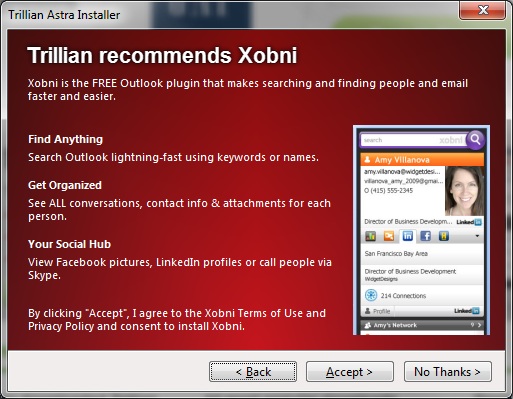
Trillian is also engaging in a different behavior from other software vendors that attempt to install Internet Explorer toolbars. Immediately after offering to install an unnecessary toolbar, they offer to install an unnecessary Microsoft Outlook plugin. This screen presents a completely different mechanism for installing this unnecessary piece of software. Note that there are not check boxes in the red area of the screen like there were in the previous dialog. As a user, my first thought when looking at this screen was “OMG, I have to install this plugin into Outlook to be able to use this instant messaging system?” It took a few seconds, but then I noticed that the navigation buttons had changed. There were two options: one to accept the plugin and another to proceed without installing the plugin.
Trillian Astra - Outlook Plugin
Needless to say, I skip installing the free toolbar, changing my search provider, and adding an Outlook plugin.
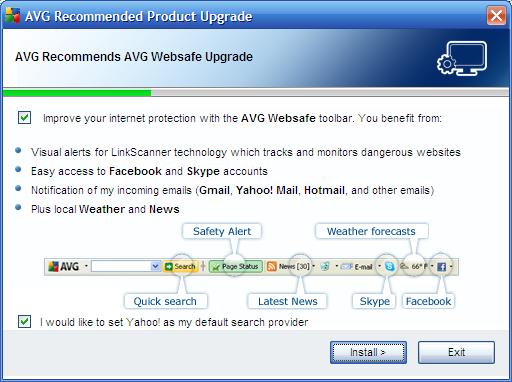
The free toolbars that software vendors think they need to include with their applications are being presented in more sophisticated, devious styles. Toolbar installations also seem to want to change the default search provider in Internet Explorer.
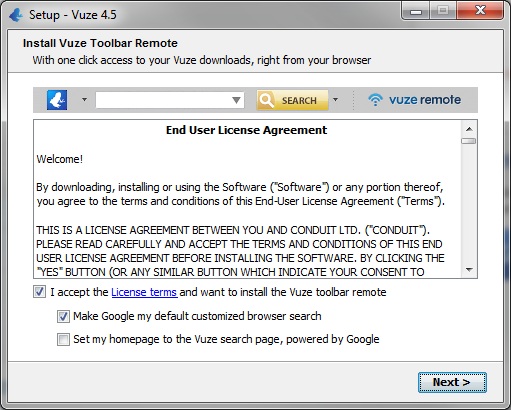
Vuze hides the toolbar remote in a “I accept the License terms” line. It isn’t clear from the text whether the license that would be accepted relates to the Vuze software itself or to the “Vuze toolbar remote.” Not accepting the license checked here does not prevent Vuze itself from being installed or operating. Therefore the license that would be accepted on this screen is actually for the toolbar. It is easy to see from this how a naive or unsophisticated user would think that the checkbox really applied to the Vuze software as a whole and that if they wanted to be able to use Vuze that the Vuze toolbar remote would also have to be accepted.
Some, like Vuze, are offering to change the homepage as well. The offers to change the homepage are usually unchecked indicating that the homepage won’t change unless the user wants. That’s nice since most user just click through these dialogs during an installation or an upgrade without even realizing what is happening.
Vuze Toolbar RemoteAVG Websafe Toolbar
It’s too bad that these dialogs can’t have all of the checkboxes to install toolbars and change search providers unchecked like the change to the homepage in Vuze.
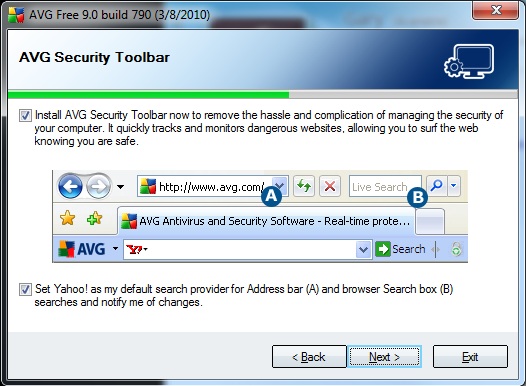
I was surprised to note that when I installed AVG on the new Win-64 system that the toolbar was present in Internet Explorer any way. I thought, initially, that it was some quirk of the installer on a 64-bit system to ignore the flag. However, closer inspection of the dialog revealed my mistake.
This particular dialog contains two check boxes. One is below the image in the usual place and one is above the image. The one below (and the one I clicked to clear without looking at the rest of the dialog) controls whether or not Yahoo! is installed as the default search provider. I don’t want programs changing my IE search provider either.
I went to visit the web site for one of my favorite bands (Judas Priest) tonight, and found that my favorite browser, Google’s Chrome, was a bit confused. It helpfully offered to translate the web site.
Chrome Offers To Translate
The only problem with the offer to help is that the web site isn’t actually in German.
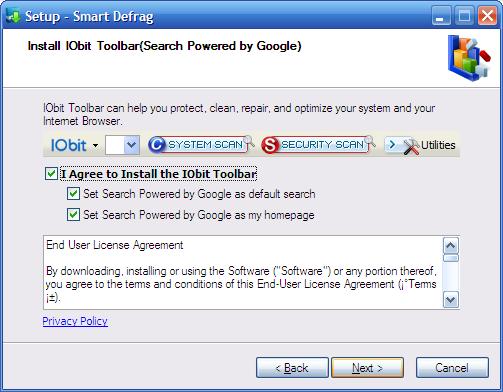
IOBit in their latest update to SmartDefrag has, at least, started offering their own toolbar instead of someone else’s. That’s an improvement … sort of …
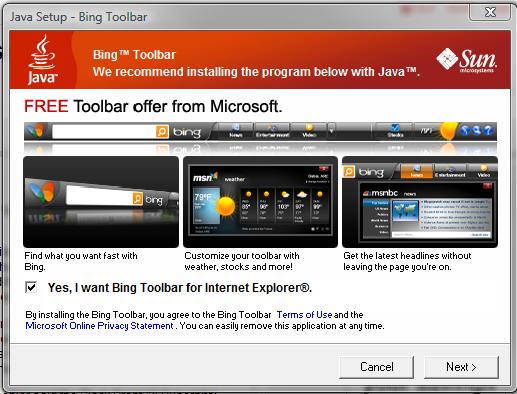
The latest version of Java attempts to install the Bing Toolbar for Internet Explorer. While it looks “cooler” than most, it is yet another toolbar that I don’t want or need.
Java and the Bing Toolbar
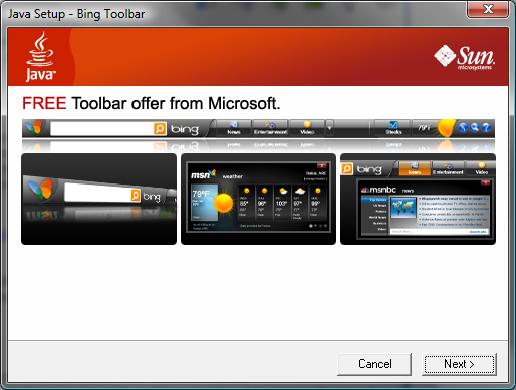
Obviously one of the things that I do is make screenshots of these various applications that want to install these superfluous toolbars. When Java Update first notified me of its desire to install this toolbar during the latest update, I did the normal ALT-PRTSCN to capture just the current window. As soon as I did that and important part of the installation progress dialog went away.
Installer Hides Bing Option
You can see that the Java installer still wants to install the Bing Toolbar. The installer lost the option to just say “No.” It is kind of surprising to see part of the dialog disappear when a screenshot. What’s so “secret” about making a screenshot of something that really shouldn’t be defaulted to “install” in the first place.
The only solution was to cancel out of the update and start over. The problems is that the Java Update application goes away and hides until it is ready to ask you about installing the latest Java update again. It took a few rounds with this Java update to learn what was happening and to get the screenshot to make this post.
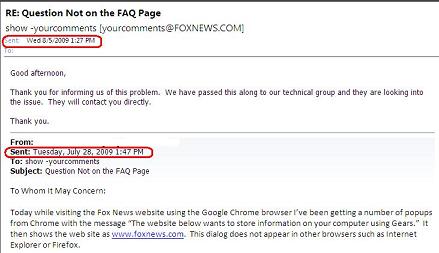
Fox News finally responded to an email that I sent them regarding their web site wanting to save information to my local system. It only took a week to get a very, very generic email back.
Fox News Responds
I guess something is better than nothing even after the problem seemed to have resolved it self.
Behind the screen you hear the clatter of dice. The Dungeon Master begins to laugh. What do you do?